
College examination and result management: from marks entry to published results
One semester exam cycle step by step, with the checks that stop wrong marks reaching students and the questions to ask of the results afterwards.
College management
Group the subjects students choose from, say how many each student picks, and record their picks. Mark entry, results and lesson registers then list only the students who take a subject, and results can be averaged by credit hours with a GPA.

In many colleges and senior classes, students in the same group take different subjects. One picks Biology, another Computer Science, and a third adds an optional language. SkoolBro keeps these choices per student, so mark entry, results and lesson registers show each subject only for the students who take it.
Open the class under Classes and select Edit subjects on its Overview tab. Tick every subject the class studies, compulsory and elective, and choose who teaches each one. If your college uses credit hours, type them in the box next to each subject, for example 3 for English or 4 for Biology. Leave the box empty if you do not use them.
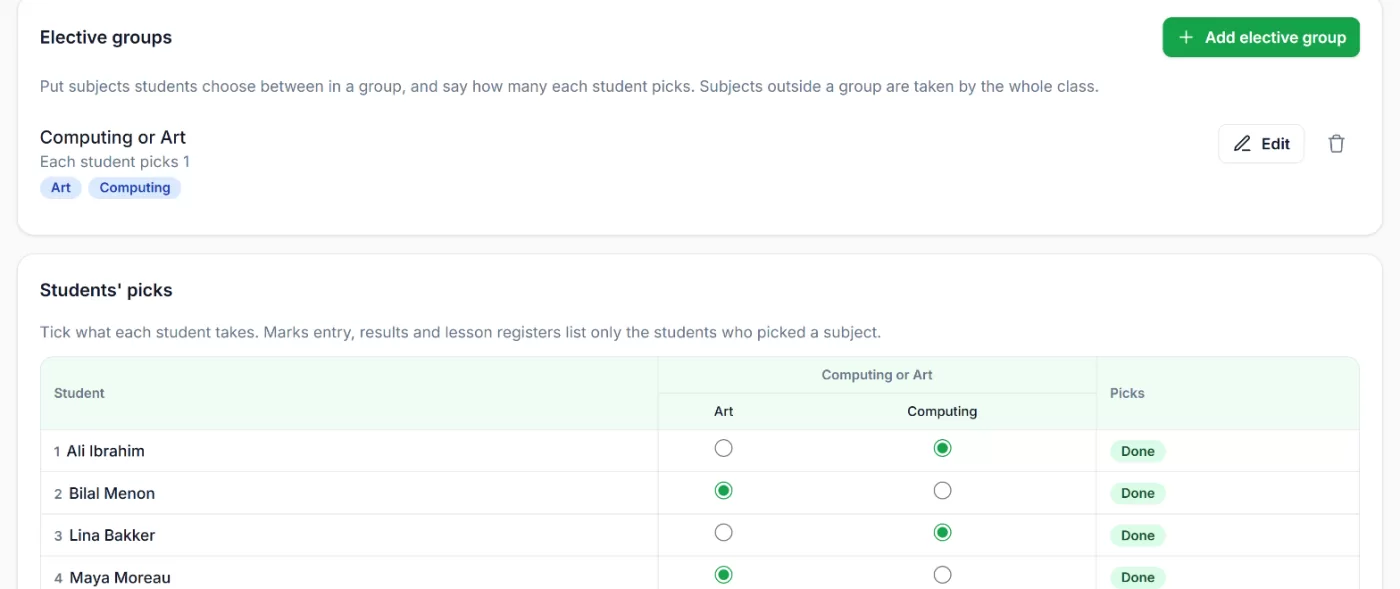
Go to the class's Electives tab and select Add elective group. Give the group a name, such as Science elective, and tick the subjects students choose between. Then set the least and the most picks:
A group needs at least two subjects, and a subject sits in one group at most. Subjects you leave out of every group stay compulsory for the whole class.
Below the groups, the picks table has a row for each student and a column for each elective subject. Tick what each student takes and select Save picks. In a group of one pick, choosing a subject replaces the other choice. The last column shows who still has to pick and who picked too many, so you can follow up before marks entry opens.
Here is an example from Hillview College, a fictional college. Group 11 A has English (3 credit hours) for everyone and a Science elective of Biology (4) or Computer Science (2). Amina picks Biology and Daniel picks Computer Science. The Biology teacher's marks sheet lists Amina but not Daniel.
Exams work as before. Each elective paper lists only the students who picked it, and its student count shows on the exam page. In the results, a subject a student did not pick shows as not taken and is left out of their total and their pass or fail.
To average by credit hours, open Exams, Grading scales, edit the scale and set Overall result to Average by credit hours. Give the bands grade points, such as 4 for A and 2 for a pass. The results table then shows the credit hours under each subject and a GPA column, and report cards get a credit hours column and a GPA box. In the example, Amina scores 80 in English and 90 in Biology: (3 × 80 + 4 × 90) ÷ 7 gives 85.71 percent. Positions follow the percentage.
Weighted results that combine several exams follow the picks too, as explained in how to combine exams into a weighted result.
Electives are often taught at the same time, with each student going to their own subject. On the class's Timetable tab, select the period, choose the first elective and its room, then select Add an elective at the same time and choose the next one with its room. Only subjects of the same group are offered, and each lesson needs its own room and teacher. In the example, Biology runs in Lab 1 and Computer Science in Lab 2 on Wednesday morning.
SkoolBro checks the picks too. In a group where students pick two subjects, two lessons a student picked cannot share a period, and a student cannot pick two subjects that already share one. Families see only their child's own lesson in the portal timetable.
If you take attendance lesson by lesson, the register for an elective lesson lists only the students who picked it, and each student's rates per subject cover only their own subjects. When electives share a period, each lesson has its own register, taken by its own teacher.
Students do not pick their own subjects in the portal; the office records the picks. For the rest of exams, see college examination and result management.
No. Subjects outside an elective group are taken by the whole class. Subjects in a group are taken only by the students who picked them, and each group says how many subjects a student picks.
That subject is left out of their total, percentage and pass or fail, and it does not appear on their report card or in the family portal.
When a grading scale is set to average by credit hours, each subject's percentage and grade points count by its credit hours. The grade points come from the points you give each band of the scale. Subjects without credit hours do not count in that average.
Yes, when they are in the same elective group. Each lesson has its own teacher, room and attendance register, and each student goes to the one they picked.
One semester exam cycle step by step, with the checks that stop wrong marks reaching students and the questions to ask of the results afterwards.

Take a register in every period from the class timetable, starting from the morning register. SkoolBro works out each student's attendance per subject, and families see it in the portal.

Choose the exams of the year and give each one a share. SkoolBro combines them per class and per subject, with grade, pass and position, prints a report card for each student and tells families when the result is published.