
An education office daily checklist, with weekly and monthly checks
What the office of any institution should check each day, week and month, who should own each item, and where to find the answer without asking around.
AI in education
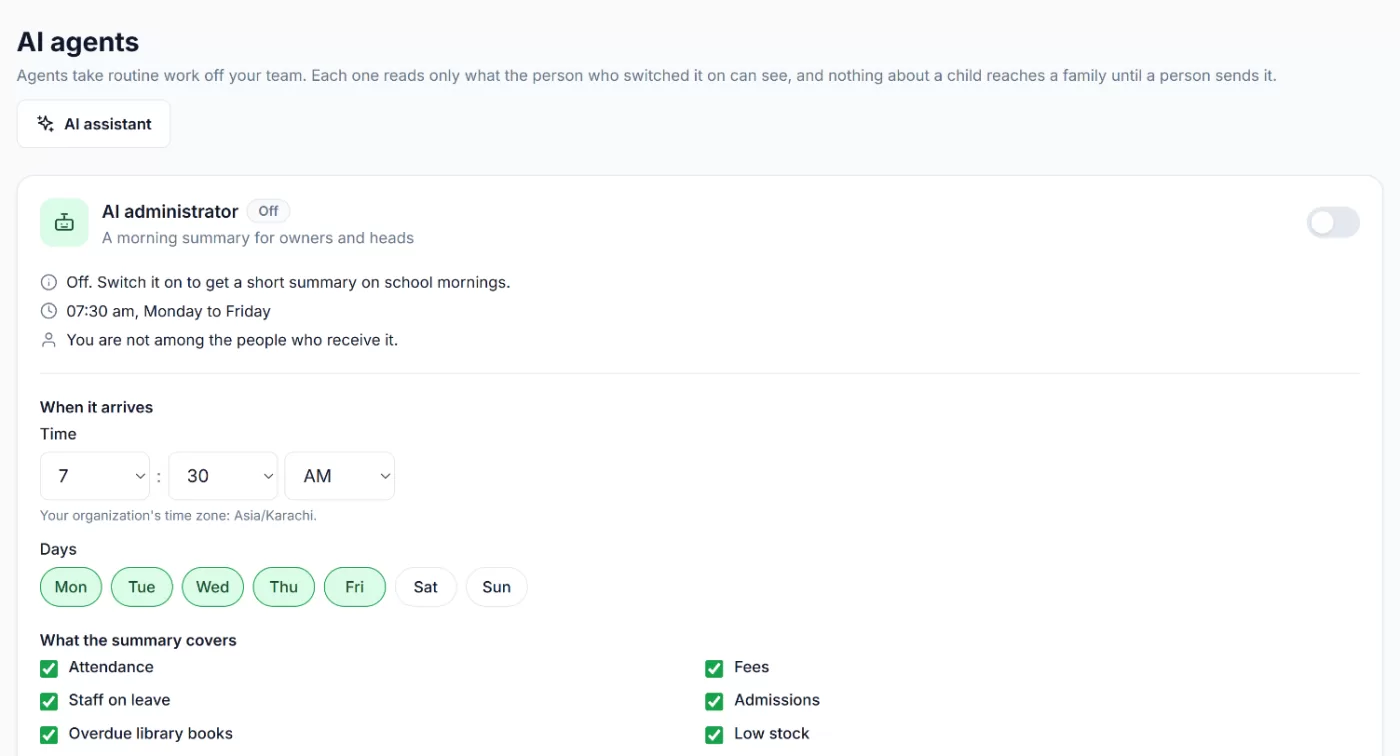
The AI administrator writes a short summary from your own records on school mornings and ends it with a "Needs attention today" list. You choose the time, the days, the parts, who receives it and the mark for a low attendance day.

A head of school starts the day with the same questions: how many children were in yesterday, who is on leave, how much is overdue, what came in from admissions. The answers sit on different screens. The AI administrator collects them on school mornings and sends a short summary to the people you choose, ending with a list of what needs attention today.
The summary has six parts, and each one can be switched off under What the summary covers:
SkoolBro works out every number in code from your records. The AI turns them into five to eight short bullets, then "Needs attention today:" with one to four bullets, or "Needs attention today: nothing urgent."
SkoolBro also decides in code what needs attention, and the AI only words it. These can appear:
The low attendance mark is 90 percent by default. You can set your own under Low attendance day below (%) on the AI administrator's card, from 50 to 99. It is separate from the low attendance list in your attendance settings and from the rules of the AI attendance agent.
Open AI agents in the sidebar. The AI administrator's card comes first. By default the owner and School Admins can switch agents on, with a recent password confirmation and a verified email address or phone number. The summary acts for the person who switched it on and covers only what they can see. If they leave or lose access, the agent pauses and the card says why.
Under When it arrives, pick the time and the days. The default is 07:30 on Monday to Friday, in your organization's time zone.
Under Who receives it, use Add a person to choose up to 20 people; with nobody chosen, it goes to you. A person receives it only when they can see every part of it and every campus it covers, so a head of one campus does not get a summary that covers three. The list shows each person's result before anything runs, for example "cannot see Overdue library books", and you can switch off that part or choose someone else.
Receiving summaries also needs the permission "See the AI agents and the summaries sent to you", which the owner and School Admins have by default. For a principal, an administrator adds it to the role on the Roles screen, as the guide to roles and permissions explains. Summaries arrive under the bell, and Also send it by email emails them too.
Send a test summary now writes one at once and sends it only to you, using one AI credit. Recent summaries are listed on the card, and each opens on its own page.
Riverbend School is a fictional school with two campuses. The owner, Mrs Achieng, switches the AI administrator on for 07:15 and adds the principal, Mr Moreau, after giving his role the permission. His line shows "cannot see Overdue library books", so she switches that part off. On Thursday the summary, titled "Morning summary for Thursday 12 November", says that attendance on Wednesday was 86 percent, two teachers are on leave and four inquiries have a follow-up due. Under "Needs attention today" come the low attendance and the two teachers whose classes may need cover, and Mr Moreau arranges cover before the first lesson.
The model gets counts, totals and short lists from the parts, never whole records. Staff on leave reach it as placeholders, and the fees part has no names at all. SkoolBro puts the real names back for the people who receive the summary. Managers who did not receive one see that it ran and who it went to, never what it said. The agents use Google's Gemini, and before anything is sent, names, phone numbers, email addresses and admission numbers are replaced with placeholders. The privacy policy has the details.
Each summary is one AI call, using one AI credit and one place in your organization's daily AI limit. A Monday to Friday schedule uses about 20 to 23 credits a month. AI agents need the Growth plan (1,000 AI credits a month) or above, and the Starter plan has no AI credits.
The morning summary is about today and the last school day. To see how fees, enrollment, attendance and results moved over a month or a term, ask the AI analytics and finance agent, and to sum up one exam by class, batch or program, the AI examination assistant. Both write only for the person who asks. AI for academy owners shows them in use.
Up to 20 people you choose. Each one needs the permission to see AI agents and the summaries sent to them, and must be able to see every part of the summary and every campus it covers. The settings show for each person whether they receive it, and why not.
By default a school day with attendance under 90 percent. You can set your own mark, from 50 to 99 percent, under "Low attendance day below (%)" on the AI administrator's card.
No. The fees part gives totals and how many students have overdue fees. The largest balances and the names behind them stay out of the summary.
It comes on the days you choose. SkoolBro has no holiday calendar yet, so it also comes on a holiday that falls on one of those days, unless you change the days for that week.
One for each summary. On a Monday to Friday schedule that is about 20 to 23 credits a month, plus any test summaries you send yourself.
What the office of any institution should check each day, week and month, who should own each item, and where to find the answer without asking around.

Ten real school office tasks sorted into what an AI assistant answers and what AI agents prepare for a person to check, with the privacy rules to agree first.

On school days the AI attendance agent reads the day registers and finds students who are often away, away on the same weekday, slipping in attendance or often late. Class teachers hear about their own classes, heads get a weekly summary, and messages to families wait in Messages to approve.