
How to use the diary for classwork, homework and notes to families
Teachers write the day's classwork, notes and homework in the class Diary tab. Families read it on a phone in the portal, and the teacher sees how many of them opened it.
School management
Tick "Families hand in work online" when you post homework. Families hand in text, photos or PDFs in the portal, and the subject's teacher sees who handed in, who is late and who is missing, then checks each piece of work with marks and a comment or sends it back.

Homework that comes back on paper is easy to lose and hard to count. Teachers spend the first minutes of a lesson asking who forgot, and parents do not know what the teacher thought of the work until the notebook comes home. In SkoolBro a teacher can mark a homework as handed in online. Families then hand in the work in the family portal, and the teacher sees and checks everything in one list.
Open Classes and go to the Homework and quizzes tab. The person who manages the school's academic rules decides:
Each school in an organization has its own rules, so a primary school where parents hand in and a college where students do can run side by side.
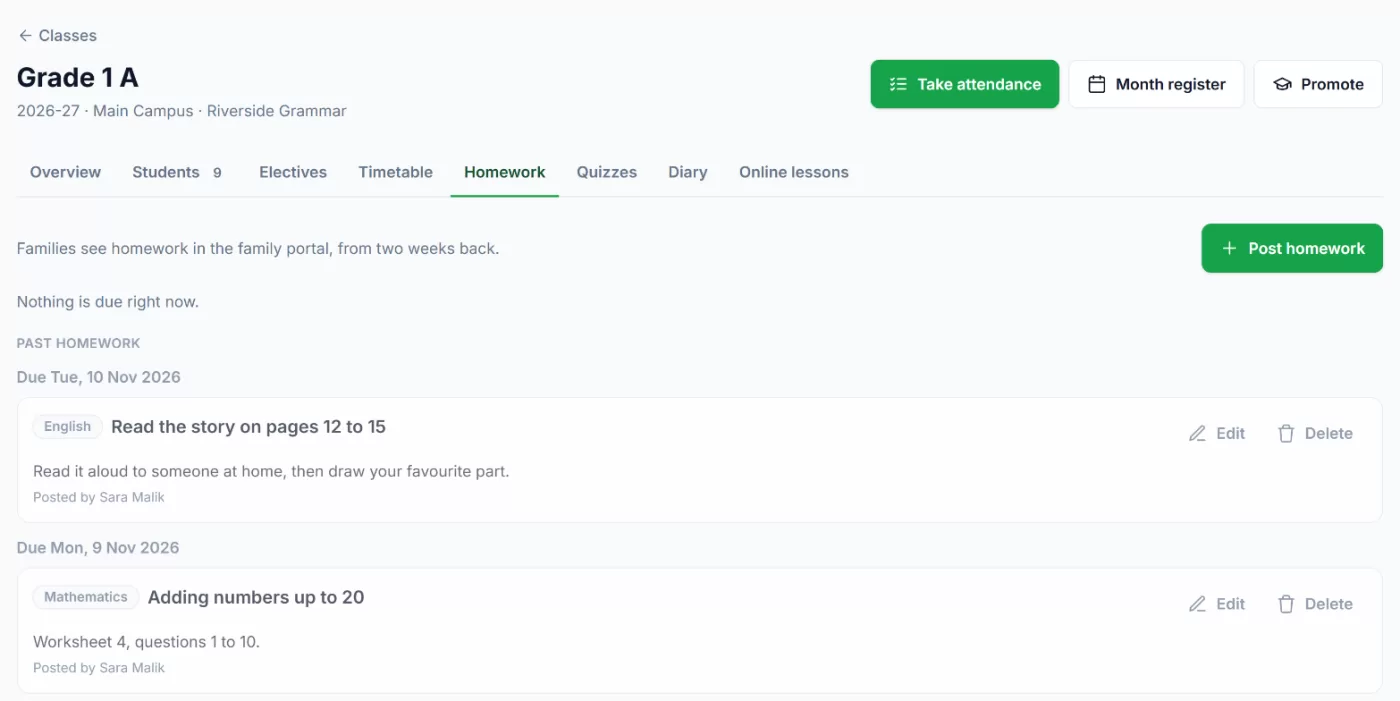
On the class's Homework tab, select Post homework, choose the subject, write the title and details and set the due date as usual. Tick Families hand in work online. If you want to give marks, type the total in Marks out of, for example 10. Leave it empty to check the work with comments only. Homework such as "Read chapter 4" can stay as it was, without online hand-in.
In the family portal, the child's Homework tab shows each homework with a Hand in button when it takes work online. The family writes the answer, adds photos of the pages or a PDF, or both, and selects Hand in. Photos and PDFs can be up to 5 MB each.
Until the teacher checks it, the family can change the work or take it back. Work handed in after the due date shows as late.
Here is an example from Riverside School, a fictional school. Ms Tanaka posts "Exercise 3, fractions" for Grade 5 Mathematics, due Thursday, marks out of 10. On Wednesday evening Ben's father photographs the two pages and hands them in from his phone. Ada hands in her answers on Friday, so they show as late.
Under the homework on the class's Homework tab, the teacher sees how many handed in, for example "18 of 24 handed in", with how many are late and how many wait to be checked. See the work opens the list of every student who takes the subject, with filters for work to check, students who have not handed in, and work already checked.
Selecting Check opens the work: the text, the photos and PDFs, the time it was handed in and who handed it in. The teacher gives marks, writes a comment, and then selects one of two buttons:
Either way, the family gets a notice in the app. Email for this notice is off by default and can be switched on, with your own wording, under notification settings.
Only the subject's teacher and the school office see and check the work. Another teacher in the same class does not.
When a subject is an elective, only the students who picked it see the homework and appear in the teacher's list. Picks are explained in how to set up electives and credit hours.
Homework handed in online sits next to the class's diary, online lessons and online quizzes, so a family finds the day's notes, the video, the work to hand in and the quiz in one portal.
Homework marks are not added into exam results or report cards. Files can be photos (JPEG, PNG or WebP) or PDFs; other file types such as Word documents are not taken. There is no plagiarism check and no marking rubric.
Each school chooses: students from their own login, parents from theirs, or both. For young children parents usually hand in, and older students often have their own login.
By default work after the due date is still taken and shown as late. A school can switch that off, and then handing in closes when the due date passes.
Yes, until the teacher checks it. A family can also take the work back. When the teacher sends the work back to redo, the family can hand it in again.
Yes, unless the school turns that off. Teacher comments always show, so a family knows what to redo even when marks are kept back.
Teachers write the day's classwork, notes and homework in the class Diary tab. Families read it on a phone in the portal, and the teacher sees how many of them opened it.

Teachers set quizzes per subject with multiple choice and typed answers, opening and closing times, a time limit and up to five attempts. Students take them in the family portal, choices are marked at once, typed answers wait for the teacher, and the results show by student and by question.

The Lessons tab keeps notes, files and video or live class links per class and subject. Families see upcoming live classes first and join from the portal. SkoolBro links to your videos and meetings and does not host them.